
%201.jpg)
Part I: Strategic Foundations and the Art of Precision Search
This first installment of our guide lays the strategic groundwork for success with LinkedIn Sales Navigator. It goes far beyond a mere feature overview, imparting the essential mindset and foundational techniques needed to not just operate the tool, but to truly master it. The focus is on the 'why' behind the platform, positioning it as a fundamental shift in sales philosophy — one that is indispensable for modern B2B success.
The New Era of B2B Sales: Why Sales Navigator is Indispensable
The B2B sales landscape has irrevocably transformed. The traditional approach, where a single salesperson targets a single contact, is obsolete. Modern purchasing decisions are complex, consensus-driven processes. On average, over eleven individuals are now involved in a typical B2B buying cycle.[4] Simultaneously, informed buyers are increasingly ignoring impersonal cold outreach attempts. In this environment, sales professionals must act as trusted advisors, which demands in-depth research and a genuine understanding of client challenges. A study reveals that 76% of top-performing sales reps consistently conduct thorough research before making contact, compared to just 47% of other salespeople.[7]

LinkedIn Sales Navigator is the direct answer to these new complexities. It transforms sales from a game of quantity to one of quality. Instead of spending hours or even days manually researching company data, organizational charts, and contacts, the platform provides a centralized, dynamic intelligence source. It enables sales professionals to reduce the time spent on research from hours to mere seconds.[4] This frees up valuable time that can instead be invested in developing personalized, relevant, and ultimately more compelling outreach strategies. The tool allows you to not only find the primary decision-maker but also identify and understand all influencers involved in the deal.[11]
Implementing Sales Navigator is more than just a technological upgrade; it represents a cultural and strategic shift for any sales organization. It mandates a departure from inefficient 'spray and pray' tactics, fostering the establishment of a strategic, research-driven methodology. The true value of the tool extends beyond merely finding a single lead. Rather, it enables you to map out the entire power structure and relationship network within a target company – a capability visualized through features like the 'Relationship Map'.[12] The ability to understand the entire buying committee isn't just a feature; it's a fundamental change in sales strategy that can make the difference between a lost deal and securing a strategic partnership.
The Anatomy of Search: Beyond Keywords
At the heart of Sales Navigator lies its search functionality, which far surpasses the standard LinkedIn search. Its true power resides in the precise segmentation and qualification of target audiences.
The Modern Search Interface
LinkedIn has designed the user interface with an optimized, two-pane view. On the left, users add or remove filters, while the search results on the right update in real-time. This dynamic adaptation creates an immediate feedback loop, significantly accelerating the list-building process and fostering an exploratory, iterative approach. Instead of executing a search and then starting over, users can progressively refine their criteria and instantly observe the impact of each modification.
Boolean Logic for Power Users
For hyper-specific searches, mastering Boolean logic is essential. Strategic use of operators allows for the creation of complex queries precisely tailored to your Ideal Customer Profile (ICP).[13]
- AND: Narrows the search. Example: ("VP of Sales" OR "Sales Director") AND SaaS AND "Enterprise Software" finds senior sales professionals in a specific software niche.
- OR: Broadens the search. Example: "VP of Sales" OR "Head of Sales" finds profiles with either title.
- NOT: Excludes terms. Example: "IT Director" NOT ("Assistant" OR "Trainee" OR "Intern") filters out junior positions and irrelevant noise from the results.
- Quotation Marks (""): For searching exact phrases. Example: "Software as a Service" ensures that precisely this word sequence is found.
- Parentheses (()): For grouping queries in complex searches. Example: (CXO OR "Chief Executive Officer") AND (Finance OR Technology) NOT "Healthcare" targets C-level executives in finance or technology, while completely excluding the healthcare industry.
AI-Powered Natural Language Search
The platform is continuously evolving, increasingly integrating artificial intelligence. An emerging capability is AI-powered search, where users can input conversational prompts like "Find me sales leaders in the software industry on the West Coast of the USA" to generate search results.[15] This indicates a trend towards a more intuitive, goal-oriented search experience. However, it's crucial to understand that this feature, currently in its pilot stage, should be viewed as a complement, not a replacement, for manual, logic-based searching. While AI search simplifies initial entry, Boolean logic offers unparalleled granular control, essential for experts. Experienced users often emphasize that Boolean search is the "true secret" to clean and precise results.[16] The most effective sales professionals will likely combine both methods: AI for initial broad exploration and Boolean operators for subsequent, surgical refinement.
The Strategic Approach: Lead vs. Account Search
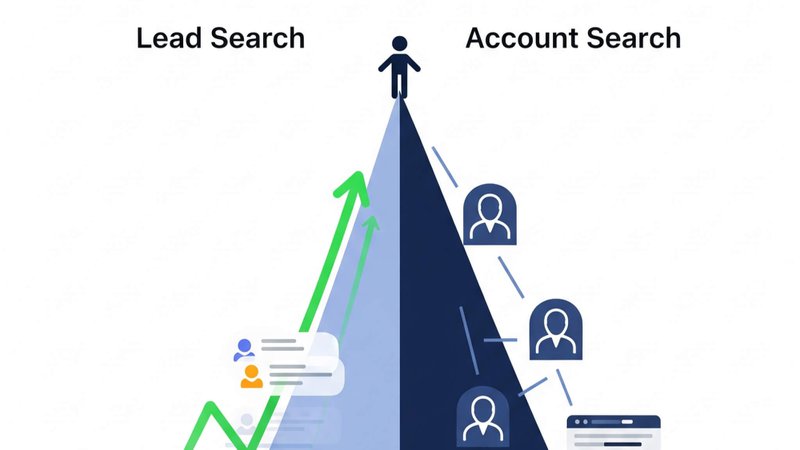
A fundamental mistake many new Sales Navigator users make is focusing solely on lead search. This approach is shortsighted and often results in contacting the right person at the wrong company, wasting time and resources. A strategic approach demands the parallel and sequential utilization of both search types: Lead Search and Account Search. This distinction isn't arbitrary; it's the technical embodiment of the Account-Based Selling (ABS) methodology.
Account Search: Finding the Right Companies
Account Search is the initial and most crucial step in any professional ABS strategy. Here, you identify companies that perfectly align with your target market. Instead of searching for individual people, you build a qualified list of target accounts. For this, you leverage filters such as industry, employee growth, technologies used, or recent funding rounds.[6] The outcome of this step is a saved "Target Account List" (TAL) – your strategic "Book of Business" within the platform.
Lead Search: Engaging the Right People
Once you've created and saved your list of ideal target accounts, the second step follows. You conduct a new, separate Lead Search. The critical distinction is that you now use the Account Lists filter to restrict your search exclusively to the TAL you previously built. This two-stage process ensures that every lead you find, by definition, works at a company you have already qualified as strategically important.
The consistent application of this two-stage workflow is the most significant differentiator between amateur and professional platform usage. Those who don't employ this process aren't truly engaging in Account-Based Selling; they're merely conducting slightly more targeted lead generation. The ability to save an account list and then use it as a filter in a lead search is the mechanism that operationalizes and scales a strategic ABS methodology within LinkedIn.
Fundamental Workflow: Personas and Saved Searches as Passive Lead Generators
To maximize efficiency and transform Sales Navigator into a continuously operating system, two functions are fundamental: Personas and Saved Searches.
Setting Up Personas
The "Persona" feature is more than just a cosmetic setting; it's an active control element for the platform's algorithm.[18] By defining criteria such as target industries, regions, and job functions, you provide the system with clear instructions on what type of leads it should proactively recommend to you.[5] A well-defined persona significantly enhances the quality of automatic lead recommendations on your homepage, making the platform a smarter partner.
The Power of Saved Searches
A "Saved Search" is not a static bookmark but an active, automated search agent. Once you've crafted a complex and precise search (e.g., a combination of Boolean logic and multiple filters), you can save it. From that moment, Sales Navigator continuously scans the network for new profiles matching these criteria. As soon as new, relevant leads are found, the system notifies the user.
The Passive Generation Engine
By combining a clearly defined Persona with multiple, highly specific Saved Searches (e.g., one for each key role within your ICP), sales professionals create a system that automatically populates their pipeline with qualified leads over time. This is immensely significant, as sales reps spend a substantial portion of their time on administrative and non-sales-related tasks. The Saved Search feature directly combats this inefficiency. Instead of manually performing the same complex search every week, it's set up once and then operates autonomously in the background. This automates the "discovery phase" for new market entrants and frees up cognitive capacity to focus on the "engagement phase." This seemingly simple feature has profound implications for time management and productivity, transforming prospecting from a purely active endeavor into a partially passive, continuous task.
What is LinkedIn Sales Navigator?
LinkedIn Sales Navigator is a specialized sales intelligence platform developed by LinkedIn to revolutionize virtual selling. It represents a paradigm shift – moving away from a general social network towards a dedicated B2B sales engine. The platform was specifically designed for sales teams, empowering them to build and manage customer relationships based on precise data, deep insights, and advanced sales tools.[1] It's not merely an extension of LinkedIn but a standalone ecosystem geared towards supporting the entire sales process, from lead generation to relationship management.
How Does LinkedIn Sales Navigator Work?
Sales Navigator's core functionality is built upon controlled and precise access to LinkedIn's entire professional network, which comprises over a billion members.[4] The tool operates by providing users with a comprehensive suite of advanced filters. These filters enable systematic segmentation and searching of the vast database to identify Ideal Customer Profiles (ICPs) and key decision-makers within target companies with surgical precision.[5] Instead of relying on simple keyword searches, sales professionals can craft complex queries precisely tailored to their strategic objectives.
Benefits of LinkedIn Sales Navigator for Businesses
The pivotal advantage for businesses lies in transforming the sales process from a reactive to a proactive, insight-driven model. Instead of waiting for inbound inquiries or working with unqualified lists, sales teams can now precisely identify and engage the most qualified prospects and accounts. This leads to a significant increase in both the quality and quantity of the sales pipeline.[5] Companies that strategically deploy Sales Navigator shorten their sales cycles, boost closing rates, and enhance the overall efficiency of their sales organization by focusing their team's time on the most promising opportunities.
Synergies Between dealcode and LinkedIn Sales Navigator
The synergy between LinkedIn Sales Navigator and AI-powered platforms like dealcode.ai emerges at a fundamental level of process automation. While Sales Navigator masterfully answers the question of who to approach by generating highly qualified lead and account lists, dealcode picks up precisely where Sales Navigator leaves off. dealcode's AI agents take these precisely segmented lists and automate the subsequent, extremely time-intensive processes of data enrichment, contact information verification, and the initiation of personalized outreach campaigns. This creates a seamless and highly efficient bridge from discovery to active engagement.
Continue to Part 2 here
Sources
- www.salesforce.com, Accessed on July 8, 2025, https://www.salesforce.com/ap/sales/what-is-linkedin-sales-navigator/#:~:text=Share%20the%20story-,Sales%20Navigator%20is%20LinkedIn's%20platform%20for%20sales%20teams%20that%20facilitates,data%20and%20advanced%20sales%20tools.
- What Is LinkedIn Sales Navigator?: A Review | Lucidchart Blog, Accessed on July 8, 2025, https://www.lucidchart.com/blog/what-is-linkedin-sales-navigator
- LinkedIn Sales Navigator: a beginner's guide - Sopro, Accessed on July 8, 2025, https://sopro.io/resources/blog/linkedin-sales-navigator-beginners-guide/
- Sales Navigator gets you more conversations with the people that matter - LinkedIn Business Solutions, Accessed on July 8, 2025, https://business.linkedin.com/sales-solutions
- How to Use LinkedIn Sales Navigator to Find Leads, Accessed on July 8, 2025, https://technologyadvice.com/blog/information-technology/how-to-use-sales-navigator/
- Is LinkedIn Sales Navigator Worth It? (2025 Review) - SalesBread, Accessed on July 8, 2025, https://salesbread.com/linkedin-sales-navigator/
- The top benefits of using LinkedIn Sales Navigator, Accessed on July 8, 2025, https://business.linkedin.com/sales-solutions/sales-navigator/benefits-sales-navigator
- How To Maximize LinkedIn's Value with Sales Navigator, Accessed on July 8, 2025, https://business.linkedin.com/content/dam/me/business/en-us/sales-solutions/resources/pdfs/linkedin-how-to-maximize-linkedins-value-with-sales-navigator.pdf
- Linkedin Sales Navigator AI Agents - Relevance AI, Accessed on July 8, 2025, https://relevanceai.com/agent-templates-software/linkedin-sales-navigator
- AI Lead Search | dealcode AI, Accessed on July 8, 2025, https://www.dealcode.ai/products/lead-search
- business.linkedin.com, Accessed on July 8, 2025, https://business.linkedin.com/sales-solutions/sales-navigator#:~:text=Sales%20Navigator%20uncovers%20every%20key,the%20influencers%20driving%20the%20deal.&text=Identify%20past%20colleagues%2C%20followers%20of,Spotlights%20in%20our%20search%20tool.
- LinkedIn Sales Navigator vs. Premium Business, Accessed on July 8, 2025, https://business.linkedin.com/sales-solutions/sales-navigator/comparison-table
- 15 Benefits of LinkedIn Sales Navigator You Probably Didn't Know - SalesRobot, Accessed on July 8, 2025, https://www.salesrobot.co/blogs/benefits-of-linkedin-sales-navigator
- In-Depth Guide for LinkedIn Sales Navigator Filters [+7 Advanced Search Hacks], Accessed on July 8, 2025, https://www.salesrobot.co/blogs/sales-navigator-filters
- LinkedIn Introduces Sales Navigator AI-Assisted Search & Account IQ - Demand Gen Report, Accessed on July 8, 2025, https://www.demandgenreport.com/solution-spotlight/linkedin-introduces-sales-navigator-ai-assisted-search-account-iq/8075/
- Better LinkedIn Sales Navigator Results with Boolean Searches - Reddit, Accessed on July 8, 2025, https://www.reddit.com/r/sales/comments/17bunuj/better_linkedin_sales_navigator_results_with/
- Stop wasting money on LinkedIn Sales Navigator: learn to use it - SocialBee, Accessed on July 8, 2025, https://socialbee.com/blog/how-to-use-linkedin-sales-navigator/
- How to use Sales Navigator - LinkedIn Business Solutions, Accessed on July 8, 2025, https://business.linkedin.com/sales-solutions/sales-navigator/how-to-use-linkedin-sales-navigator
- LinkedIn Sales Navigator Cost: Is It Really Worth it? | Factors Blog, Accessed on July 8, 2025, https://www.factors.ai/blog/linkedin-sales-navigator-cost
- dealcode AI | Sales Automation powered by AI Agents, Accessed on July 8, 2025, https://www.dealcode.ai/
- Sales Navigator Advanced Search Filters - LinkedIn Business Solutions, Accessed on July 8, 2025, https://business.linkedin.com/sales-solutions/compare-plans/advanced-search-filters
- LinkedIn Advanced Search Tactics 101 - Cleverly, Accessed on July 8, 2025, https://www.cleverly.co/blog/linkedin-advanced-search-tactics-101
- dealcode AI Companion App: Boost Your Sales Efficiency ..., Accessed on July 8, 2025, https://www.dealcode.ai/blog/dealcode-ai-companion-app-chrome-extension-sales
- What is LinkedIn Sales Navigator? | Clay, Accessed on July 8, 2025, https://www.clay.com/glossary/linkedin-sales-navigator
- AI for Sales | LinkedIn Sales Navigator - LinkedIn Business Solutions, Accessed on July 8, 2025, https://business.linkedin.com/sales-solutions/sales-navigator/ai-for-sales
- Sales Revolution with AI Sales Automation | dealcode AI, Accessed on July 8, 2025, https://www.dealcode.ai/blog/sales-revolution-with-ai-sales-automation
- Your Guide to LinkedIn Sales Navigator Pricing (2025), Accessed on July 8, 2025, https://salesbread.com/linkedin-sales-navigator-plans-and-pricing-comparison/
- LinkedIn Sales Navigator Cost: 2025 Pricing Guide - Skrapp, Accessed on July 8, 2025, https://skrapp.io/blog/linkedin-sales-navigator-cost-and-pricing/
- Sales Integrations & Partners | LinkedIn Sales Navigator - LinkedIn Business Solutions, Accessed on July 8, 2025, https://business.linkedin.com/sales-solutions/partners
- Pricing - dealcode AI, Accessed on July 8, 2025, https://www.dealcode.ai/pricing
- LinkedIn TeamLink: Maximize Your Network | A Complete Guide, Accessed on July 8, 2025, https://scrupp.com/blog/linkedin-teamlink-what-is-it
- Advanced Guide to LinkedIn Sales Navigator Search Filters - Blaze - Marketing Analytics, Accessed on July 8, 2025, https://www.withblaze.app/blog/advanced-guide-to-linkedin-sales-navigator-search-filters
- LinkedIn Sales Navigator vs LinkedIn Premium [Compare] - Kaspr, Accessed on July 8, 2025, https://www.kaspr.io/blog/linkedin-sales-navigator-vs-linkedin-premium
- How Much LinkedIn Sales Navigator Costs? [2025 Pricing] - Evaboot, Accessed on July 8, 2025, https://evaboot.com/blog/how-much-does-linkedin-sales-navigator-cost
- LinkedIn Sales Navigator Pricing: What To Choose In 2025? - Prospeo, Accessed on July 8, 2025, https://prospeo.io/blog/linkedin-sales-navigator-pricing/